
Log expenses by voice or text, in your own words
Say or type a sentence like "spent 24 on groceries" and Pocket PnL turns it into a draft entry. You check it, tap Save, and you're done. There's no form to fill in.

Free on iPhone. Needs iOS 17 or later.
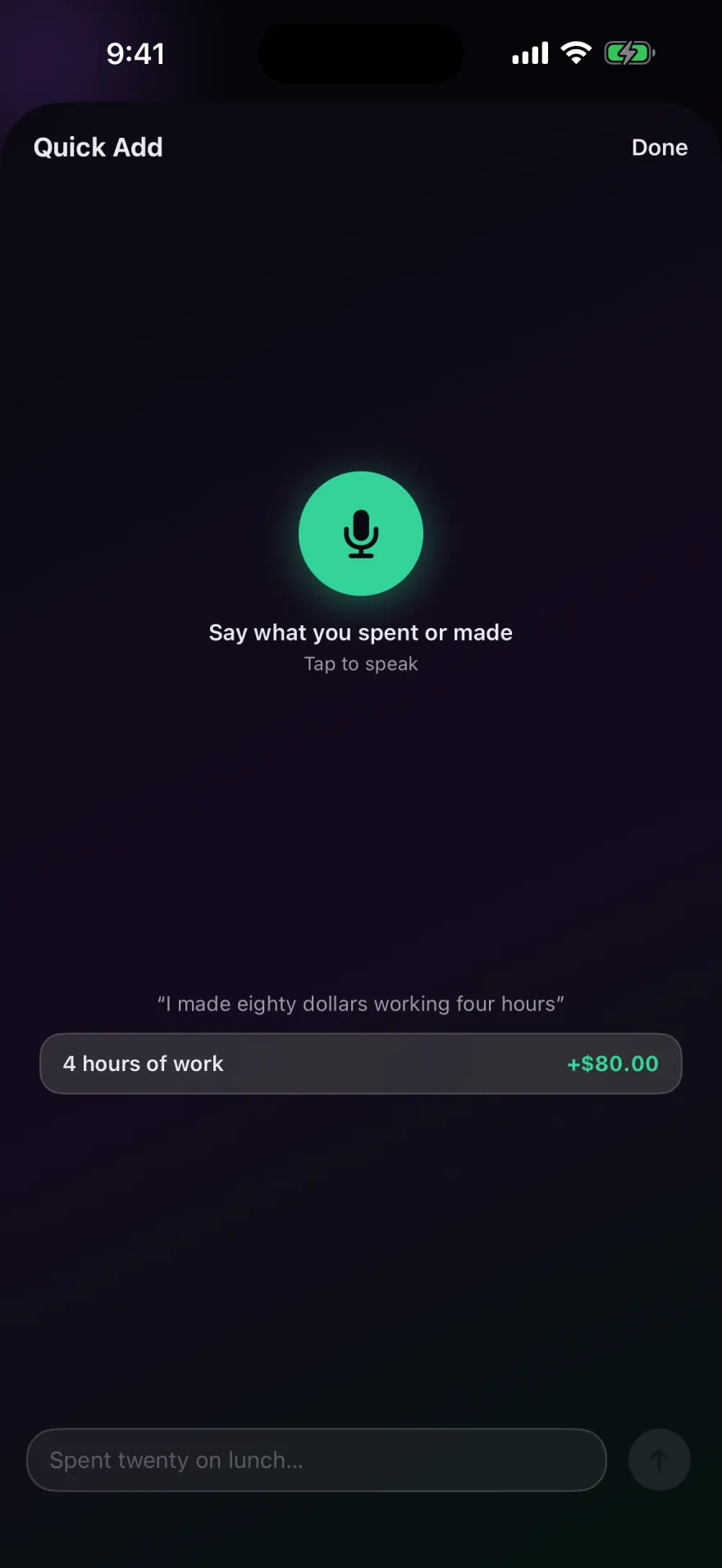
How Quick Add reads a sentence
Quick Add looks for three things: whether money came in or went out, how much, and what it was for.
- In or out. The first money word in the sentence decides. "Made", "earned", "received", "sold", "won" and "got paid" mean income. "Spent", "paid", "bought" and "lost" mean an expense. With no money word at all, it assumes an expense, since that's what most entries are.
- The amount. Digits work, and so do number words. "Twenty ninety five" becomes 20.95. Hourly pay works too: "worked 4 hours at 20 an hour" becomes +80.00.
- The note and tag. What's left becomes the note. If a word matches one of your tags, such as Groceries or Rent, the entry gets that tag.
When an amount could be read two ways, Quick Add picks one and lets you switch with a tap. "Two fifty" comes out as 2.50, with 250.00 one tap away. A dictated "2250" comes out as 22.50, with 2,250.00 as the other choice.
Examples
| You say or type | Draft | Note |
|---|---|---|
| spent 24 on groceries | −24.00 | groceries |
| got paid 1200 | +1,200.00 | (empty) |
| worked 4 hours at 20 an hour | +80.00 | 4 hours of work |
| twenty ninety five for lunch | −20.95 | lunch |
| sold my old bike for 150 bucks | +150.00 | old bike |
Each sentence makes one entry. The Quick Add sheet stays open after you save, so you can log a few things in a row, like everything from a trip to the shops.
What happens to your voice
Pocket PnL uses Apple's speech recognition. On iPhones that support on-device recognition, the audio is transcribed on the phone and never leaves it. Where on-device recognition isn't available for your device or language, iOS sends the audio to Apple's speech service, which handles it under Apple's privacy policy. The app's developer never receives the audio or the transcript, and recording only happens while you're using Quick Add.
The microphone and speech permissions are optional. If you decline them, you can still type into Quick Add or use the regular add screen.
Even faster than opening the app
The Quick Add widget starts an entry from your Home Screen, and Siri can log one without opening anything: say "Log an expense in Pocket PnL" and answer how much. See widgets and Siri Shortcuts.
Good to know
- Quick Add understands English sentences. The rest of the app is also available in French, German, Italian, Japanese, Portuguese and Spanish.
- It doesn't read dates. To put an entry on another day, open it after saving and tap the date.
- It only recognizes dollars and bucks as currency words. To log another currency, use the currency picker on the add screen. See multiple currencies.
- Quick Add is rule-based: it follows fixed rules on your iPhone and doesn't send your sentence to an AI service.
Start with today's coffee.
There's no account to make first. Open the app, tap minus and type the amount.
Free on iPhone. Needs iOS 17 or later.