
A receipt scanner for your own spending
Point your iPhone at a receipt and Pocket PnL reads the total, the store, the date and how you paid. It fills in a draft for you to check, and the photo stays with the entry. Your first 5 receipts are free.

Free on iPhone. Needs iOS 17 or later.
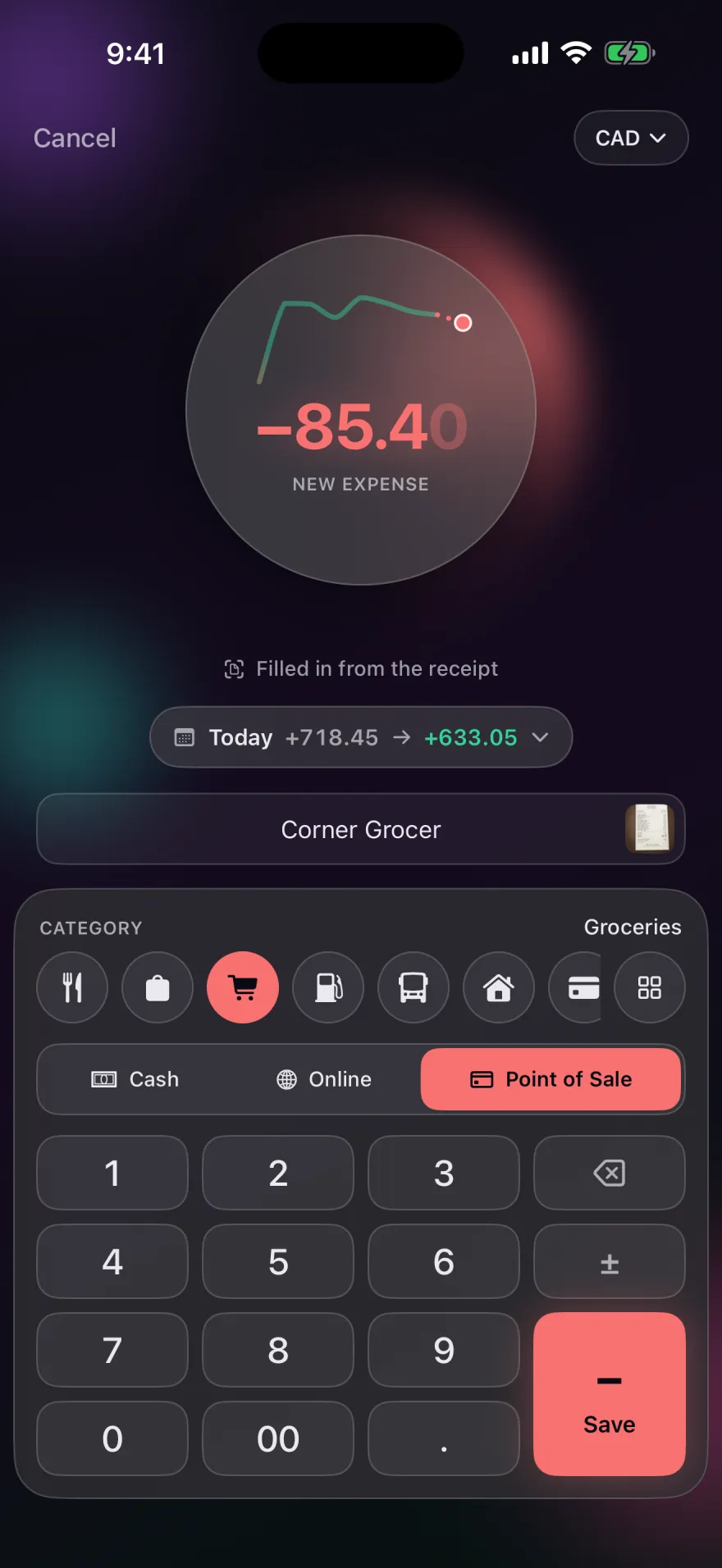
What the scanner reads
- The total. A refund comes back as money in. If a receipt has no line labelled total, Pocket PnL uses the largest amount and asks you to check it.
- The date and time printed on the receipt.
- The store name.
- The currency and payment method, when the receipt shows them.
- A category. Pocket PnL suggests one from what you've logged at that store before, or from the kind of shop it is, using your own tags.
A scan never saves on its own. Everything lands in a draft you can correct, and the entry is only stored when you tap Save.
How to scan a receipt
- On the Today screen, tap the scan button next to Quick Add.
- Hold the receipt in view. Apple's document camera finds the edges and flattens the image. A long receipt can be scanned in several pages, and they're joined into one image.
- Check the draft, change anything that's off, and tap Save.
You can also attach a photo you already have, like a screenshot of an online order, or add a photo to an entry you logged earlier. Long-press an entry to see its receipt.
Where the photo goes
The text on the receipt is read on your iPhone by Apple's built-in text recognition, so the image isn't sent to a scanning service. Before saving, Pocket PnL shrinks the photo and strips everything except the picture itself, including the location and camera details your iPhone records with a photo.
The photo is then stored like the rest of your entries: on your iPhone and in your private iCloud, where the developer can't see it. Each receipt syncs as its own record, so photos only download when you open them and don't slow down the rest of the app.
Sharing an entry
With Pro, any entry can be shared as a clean image showing the amount, the date, its tag and card, and the receipt photo if you want it included. Sharing the receipt photo by itself is always free.
Price
Receipts are part of Pocket PnL Pro. Your first 5 receipts are free, scanned or attached, so you can try it properly before deciding. After that, Pro is $29.99 once or $9.99 a year. If Pro ends, the receipt photos you already have stay viewable, shareable and deletable.
Using receipts for taxes or expense reports
Pocket PnL is built for personal spending. If you keep receipts for taxes or work expenses, know that the CSV export includes the entries but not the photos; share the photos you need from each entry.
Start with today's coffee.
There's no account to make first. Open the app, tap minus and type the amount.
Free on iPhone. Needs iOS 17 or later.